In Colombia, many customers would rather message on WhatsApp than call or fill in a form. That is an advantage, but only if the channel is well connected to your website and someone replies in an organized way.
WhatsApp Business: what the free app includes
If you still serve customers from a personal WhatsApp, the first step is moving to WhatsApp Business, the free app for companies. At no cost, it gives you:
- A business profile with address, hours, description, email and website.
- A catalog of products or services with photos and prices.
- Automatic messages for greetings and away messages outside business hours.
- Quick replies for the most common questions.
- Labels to sort chats: new, quoted, payment pending, customer.
When to move to the business platform
The app works very well for small businesses. As volume grows, there is the WhatsApp Business Platform (known as the API), designed to connect with other systems.
| Criterion | WhatsApp Business app | Platform (API) |
|---|---|---|
| Cost | Free | Meta charges for template messages the business initiates; replying within 24 hours of the customer’s message is free |
| Who replies | A few people on their phones | Several agents at once from a dashboard |
| Automation | Greeting, away message and quick replies | Automated assistants and custom flows |
| Integrations | Limited | With your website, inventory, invoicing or customer system |
| Automatic notices | No | Yes: order confirmations, payment or appointment reminders |
A clear sign it is time: messages get lost because one person can’t keep up, or you manually repeat notices that could be sent automatically.
Connect WhatsApp to your website
The simplest way is a WhatsApp link. It uses the number in international format (57 for Colombia, without spaces or the + sign) and, optionally, a prefilled message:
https://wa.me/573001234567?text=Hi%2C%20I%27d%20like%20a%20quote
Tapping it opens the chat with that text ready to send. Three ways to make the most of it:
- A different message per page: from the plans page, “I’d like information on the 20 Mbps plan”; from coverage, “I want to know if there is service at my address”. That way you know where each customer came from.
- A visible button on phones that doesn’t cover the content or other buttons.
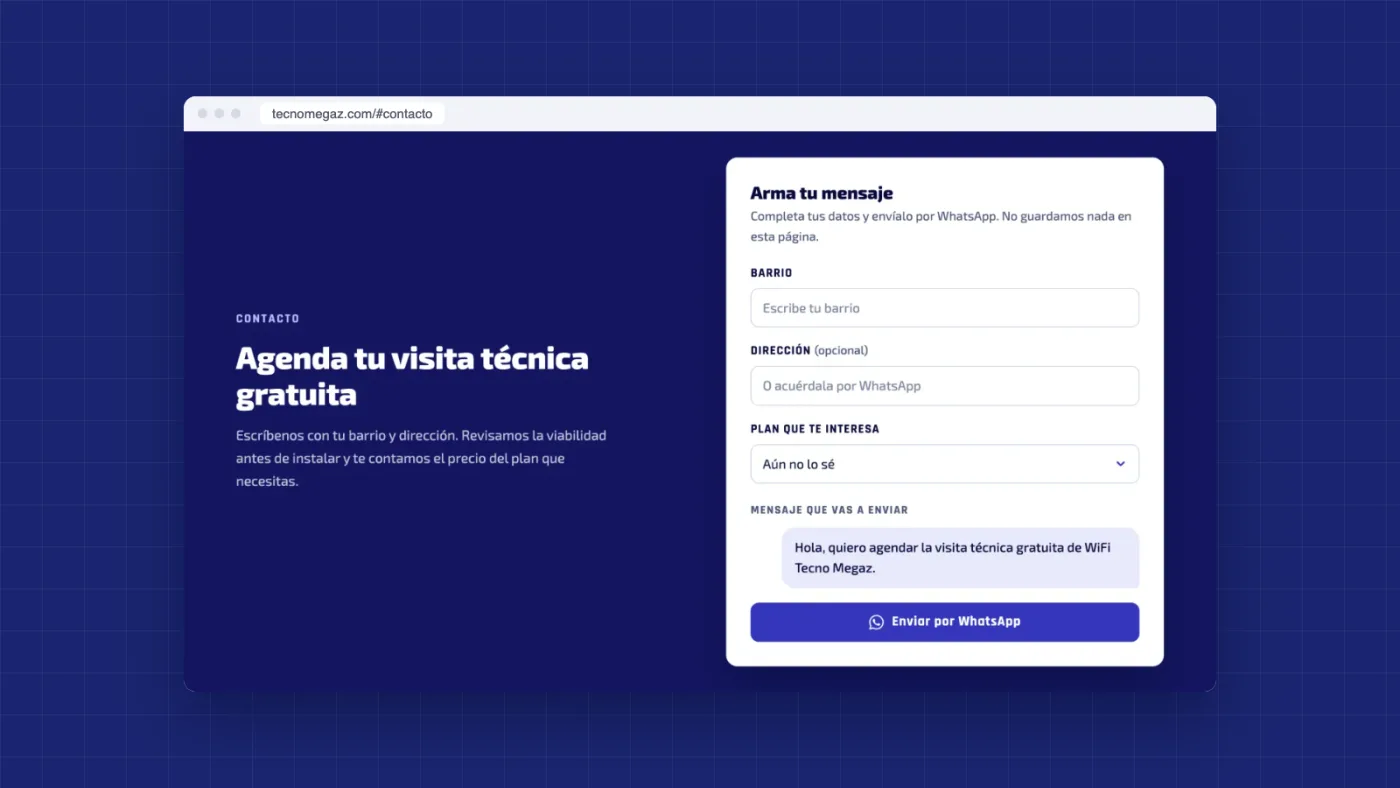
- A form that builds the message: the customer picks their details and the site prepares the full text. We did this for WiFi Tecno Megaz: visitors type their neighborhood, address and plan, and the message arrives organized, without the page storing any data.
Organize customer service
A good channel isn’t just technology: it is a process. The minimum for it to work:
- Assign someone responsible and a response time you can keep.
- Publish your hours and turn on the away message so nobody feels ignored.
- Prepare quick replies for prices, coverage, payment methods and warranties.
- Label every chat by status to follow up on pending quotes.
- Review every week which questions repeat and add the answers to your website.
Common mistakes
- Using a personal number: if that person leaves, the business loses the chats and contacts.
- Sending bulk messages without permission: users can report the number and WhatsApp may restrict it. In Colombia you also need authorization to use personal data for commercial purposes, under Law 1581 of 2012.
- Not keeping history: turn on backups so you don’t lose important conversations.
- Leaving the button unanswered: a link to a WhatsApp nobody answers does more harm than having none.
Want to connect WhatsApp to your website or automate customer service?
We reply within 24 hours, and advice is free.